Compatible with Chrome and Edge
Instruction Guide
We have a simple tutorial guide which explains the features of the software extension and what each button inside the extension does. Read our tutorial and welcome guide on how to use the extension to the fullest. Use all the features of this browser software.
If you are interested in other web extensions to install, you might wish to check out the Microsoft Bing Search with Rewards extension.
Microsoft Bing Search with Rewards Extension
It allows you to complete daily offers to get points.
Track the number of points you have currently and the rewards you can redeem with these points.
The ways to get points & get rewarded is search with Bing, browse with Microsoft Edge and shop at the Microsoft and Windows stores to earn rewards.
Sponsored Link:
Other useful extensions
Another extension which would be useful to install is the iCloud bookmarks extension.
It allows to keep your Chrome bookmarks on Windows synced up with the Safari bookmarks on your iPhone, iPad, and Mac.
iCloud will store your website bookmarks so it is accessible even on your iPhone and Mac.
Try these other two extensions and see if it will boost your daily productivity.
Test responsive web designs or mobile pages that detect specific user agents. Test multiple devices at the same time!
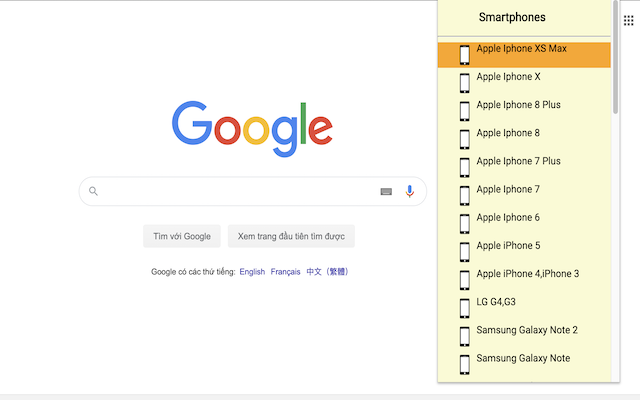
The Mobile/Responsive Tester extension allows Developers to test their web pages against common mobile, phablet and tablet devices by emulating the user agent and screen resolution.

Features:
- Allows you to view website with multiple screen modes.
- Choose popular screens like iPhone, Samsung.
When you need to test your website or app on mobile devices, you have to think outside of the box. You can't use a mobile device simulator (like iOS Simulator in Xcode) because it doesn’t actually run on physical hardware. You also can’t rely on an emulator because it won’t behave exactly as a real device does. If you want to accurately test your mobile application, there’s only one place to go: dedicated Android test devices.
Please note as our chrome extension is just a mobile device simulator, the UI wont look exactly like how it would on a real hardware device. This is just a useful software to test how your website would look on different mobile specifications.
However, if you want to be 100% accurate, the only way to do so is to actually buy the actual Android phone model to ensure your website looks great in that specific mobile device dimensions.
There are several tools that can help you check how your website looks on different mobile devices. The most popular options include BrowserStack, Browserling and Cross Browser Testing. BrowserStack has a paid plan, while Browserling and Cross Browser Testing are free to use.
Tutorial:
- Install the Extension
-
After installing the extension, click on the icon
 on the toolbar.
Sponsored Link: